TikTok rolls out new feature 'Bulletin Board'
TikTok's new feature Bulletin Board allows content creators to share quick updates and announcements directly with their followers

Most popular short-video content platform TikTok has introduced a new feature for its content creators and brands on November 13, 2025.
Newly introduced feature “Bulletin board” works similarly as Instagram broadcast channels which was introduced by meta owned platform in 2023.
The new feature allows creators to establish a dedicated channel to share one-way public messages, quick updates and announcements directly with their followers.
Through “Bulletin board” only creators will be allowed to post public messages while followers can respond with emojis.
Moreover, the creators can share their content in text, image and video formats.
TikTok, is initially rolling out this new feature for creators who are above 18 and have a minimum of 50,000 followers.
While introducing this new feature through a blog post at its official website TikTok shared that, “Bulletin Board is a one-to-many broadcast channel, making it quick and easy for creators to post news and updates and share exclusive content.”
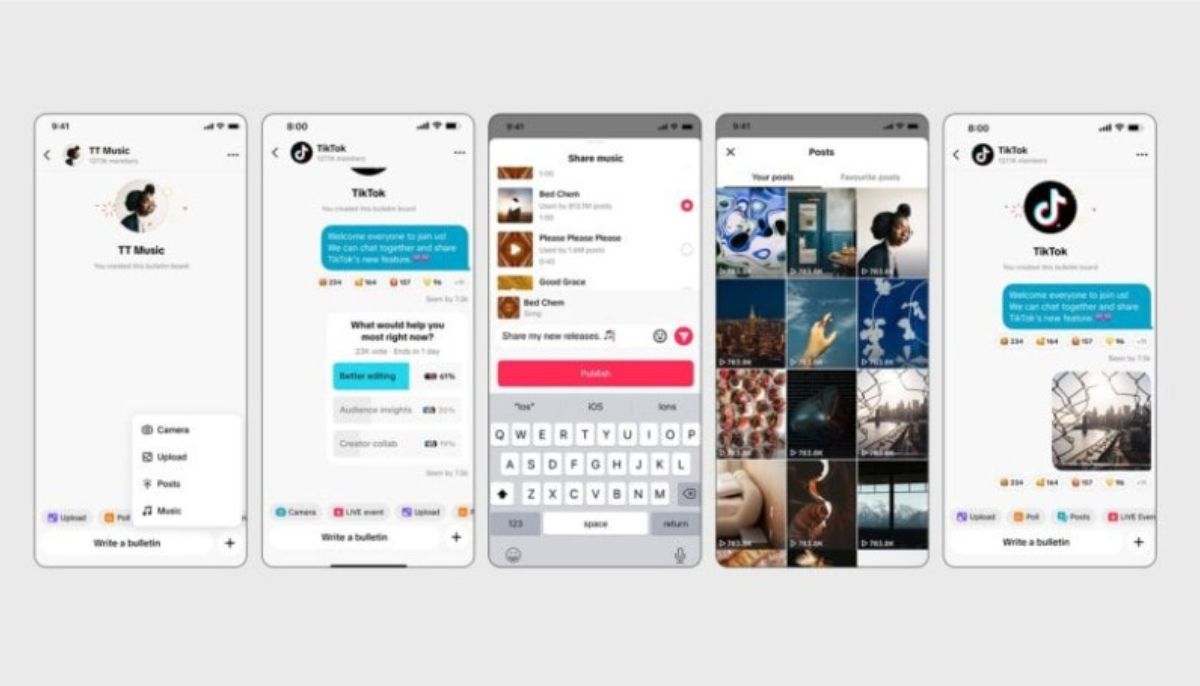
The goal is to help creators share quick updates giving them a new way to reach their audiences.
Instead of posting through a story or regular TikTok post creators can use Bulletin board to share their updates.
The feature is designed to help creators and brands build community by sharing updates, news and exclusive content as per the official release.
While launching a new feature the short-video platform informed, “Just like everything on TikTok, all content must adhere to our Community Guidelines, which we enforce using a combination of technology and human moderators.”
“Our safety tools for muting, blocking, and reporting users and content are available within the Bulletin board to help keep communities safe and positive,“ explained TikTok in a blog post.
How to use ‘Bulletin board’ in TikTok
- Creators can start a "Bulletin board" by going to their inbox and selecting the option.
- They can turn the "Show on profile" setting on or off to control visibility and pick a name for their board.
- While followers can join by clicking the Bulletin board’s name under the creator’s bio. Once joined, they will receive notifications in their inbox whenever the creator posts any update.






-
 Savannah Guthrie's major secret move exposed for search of mom Nancy
 -
 Sepideh Moafi clears up beef rumors with 'The Pitt' co-star Noah Wyle
 -
 Drake rewrites history as 'Janice STFU' storms to No.1 on Billboard
 -
 Dog off lead sends sheep to their deaths: Here's what happened
 -
 American Music Awards honours Darius Rucker with Veterans Voice Award
 -
 Barry Manilow feels 'hurt' after spending years in THIS
 -
 Elderly man mauled by 'large' dog as police hunt blonde owner
 -
 Kyle Larson's son melts hearts with kind gesture toward Kyle Busch's son