WhatsApp now allow users to protect their private chats with 'secret code'
WhatsApp locked chats can now be completely hidden from view until users input their secret code
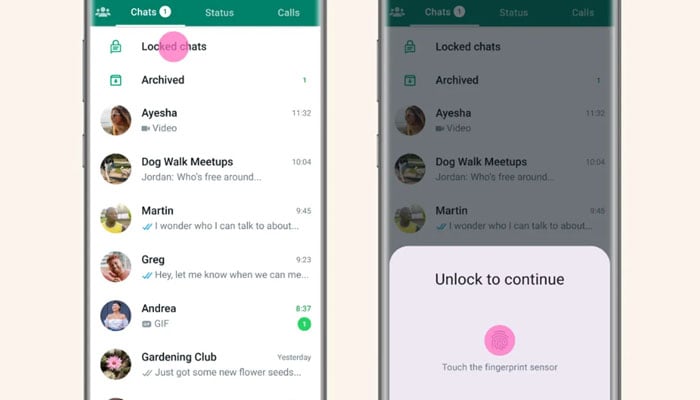
WhatsApp has recently introduced the chat lock tool to assist users in keeping their "most sensitive discussions" secure from prying eyes by password-protecting them and placing them in a different folder.
Furthermore, alerts from locked chats cannot appear at inconvenient times, such as when you've just transferred the phone to a buddy to look at images.
Locked chats will now be completely hidden from view until users input their secret code in the search bar, which will show all the discussions you don't want others to check on.
Previously, any over-the-shoulder peekers could see that a user had a closed conversations folder, which was a guaranteed way to spark attention - or suspicion.
Announcing Chat Lock in May, WhatsApp owner Meta CEO Mark Zuckerberg said: "New locked chats in WhatsApp make your conversations more private. They’re hidden in a password protected folder and notifications won’t show sender or message content."
"We're so thrilled our community has been embracing Chat Lock, and hope that secret code makes it even more valuable to them," the firm said in a statement announcing the latest upgrade.
"Secret code starts rolling out today, and in the coming months will be available globally. We’re excited to keep bringing more functions to Chat Lock to help people protect their privacy, let us know what you think."
Users will have the option to retain their closed chats on the main conversations menu rather than hiding them.
WhatsApp is actively developing many privacy features, including "listen once" voice notes, which are now under beta testing.
In other long-awaited news, WhatsApp just offered the option to enter into two unique accounts on the same phone and switch between them.
It was introduced as a method to unite the "work you and fun you" in one device, but it was also marketed online as a "cheater's paradise" allowing secret accounts to be kept concealed without the need for a burner phone.
How to hide locked chats on WhatsApp
So far, like with everything on the app, switching appears to be rather straightforward.
According to a screenshot obtained by WABetaInfo, it will be a matter of turning on "hide closed chats" and entering a secret code to gain access to them.


-
 Can cancer drugs be made in space? Here’s what the new mission aims to find out
 -
 SpaceX Falcon 9 successfully launches Bandwagon-5 mission with 32 payloads
 -
 Europe launched 8 orbital rockets last year, can it rival Starlink?
 -
 Japan launches world’s first mission to bring sample back from phobos
 -
 Orionid meteor shower 2026: Peak date, viewing tips and what to expect
 -
 Why Mars looks blue in NASA’s unedited curiosity panorama?
 -
 Blue Origin upgrades new Glenn rocket launch infrastructure to take on SpaceX
 -
 NASA’s next Mars mission targets Phobos and Deimos, not Red Planet