How to use Meta AI to create images on WhatsApp?
Generate image using Meta AI on WhatsApp

Meta has entered the artificial intelligence race (AI) by introducing its chatbot, Meta AI.
You can now use the chatbot across all of Meta's social media platforms such as Facebook, Instagram and WhatsApp, Techloy reported.
The Meta AI chatbot also lets you create images with a simple prompt "imagine".
You can use the feature to create images out of personal references or to make business advertisements by providing a description of what you want.
How to create images with Meta AI?
Open Meta AI chat on WhatsApp. If you can’t find it, just write “Meta AI” on the search bar.
In the chatbot, write "imagine" followed by what you want it to create.
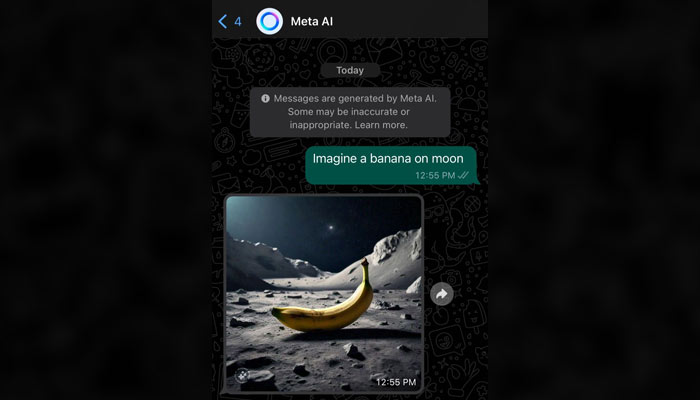
You can also use this feature in your personal or group chats.
To use, just open any chat you want to send, Type @ and tag Meta AI.
Followed by imagine and your text prompt. Tap on Send and your generated image will be displayed in the chat.
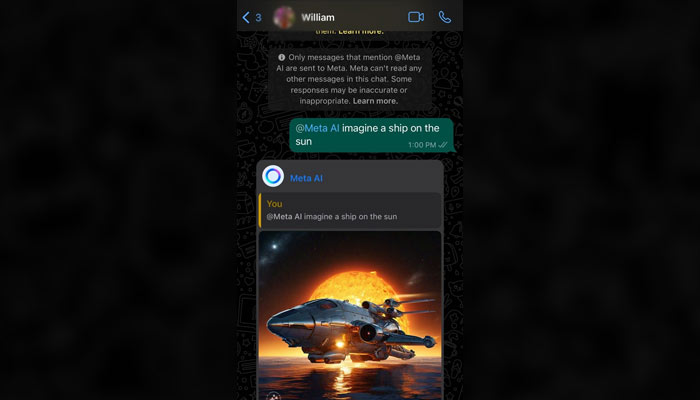
As Meta AI is a new feature, it is still evolving and may not be the most accurate at times.
By trial and error, you can create unique and engaging images to share on WhatsApp.


-
 Scientists develop technology to send smells through phones
 -
 Earth’s close encounter with giant asteroid Apophis is less than 3 years away
 -
 Chinese astronomers discover real-life three-body system unlike Liu Cixin’s fiction
 -
 Hunter’s Moon 2026: When and how to watch October’s full moon
 -
 Elon Musk’s Mars colonization dream faces reality check from Nobel laureate
 -
 NASA competition model 2.0 cuts mission selection by 45%
 -
 A ‘neglected’ neutrino may hold the key to why the Universe exists
 -
 Can cancer drugs be made in space? Here’s what the new mission aims to find out