
3 things to know before you set up a Google passkey
A new Cybersecurity Awareness Month push asks you to swap passwords for passkeys. Setup starts at g.co/passkeys
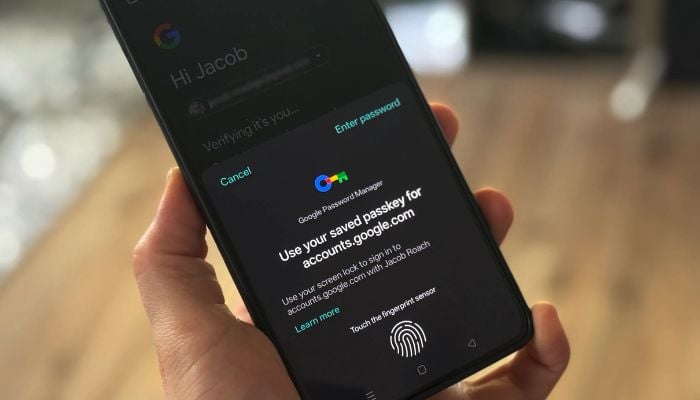
Google made passkeys the default sign-in option for personal accounts in October 2023. Three years later, it is still asking you to switch. This Cybersecurity Awareness Month, the company is back with a fresh nudge and a short guide to setting up a Google passkey.
The passkey allows users to log into their accounts using either fingerprint, facial scan, or PIN of their device, just like unlocking their phones. However, adoption of the passkey seems to have taken longer than Google would have liked, and they have certainly not abandoned the concept.
Are passkeys safer than passwords?
Google says yes, for two reasons. Passkeys are designed to resist phishing, and unlike a password, they can't be guessed or reused across sites.
There is also a technical safeguard supporting the claim. Passkeys can be used only for the specific website or application on which you have set up that passkey, meaning that even a convincingly fake login page will be empty.
Biometrics are protected as well. Google claims that your fingerprints or facial image stays with your device and is never transmitted to their servers.
How to set up a Google passkey?
Go to g.co/passkeys, select "Create a passkey" and continue following the instructions. Starting today, signing in to your Google Account will use the same unlocking process that you use to unlock your device.
Since Google introduced the passkeys as the default in 2023, passwords have remained an option as a backup. Bitdefender commented back then that it would be much more difficult for companies than for people.


-
 EU charges TikTok over harmful content rabbit holes: What to know
-
 Meta announces major pause in planned updates
-
 FBI confirms record $6.3 Billion Binance crypto heist linked to North Korea’s elite state-sponsored hackers
-
 Tesla announces major downsizing of Cybertruck production at Texas gigafactory
-
 Google, Meta and TikTok take legal fight to California over youth social media law
-
 Does swearing at AI chatbots get you better answers?
-
 WhatsApp can now expand photos to fit your status screen
-
 Starlink Mobile to deploy tens of thousands of 5G sites